

Notification Settings
Notification Settings
By clicking on your icon on the top right on the page and clicking Settings, you enter the Settings page.
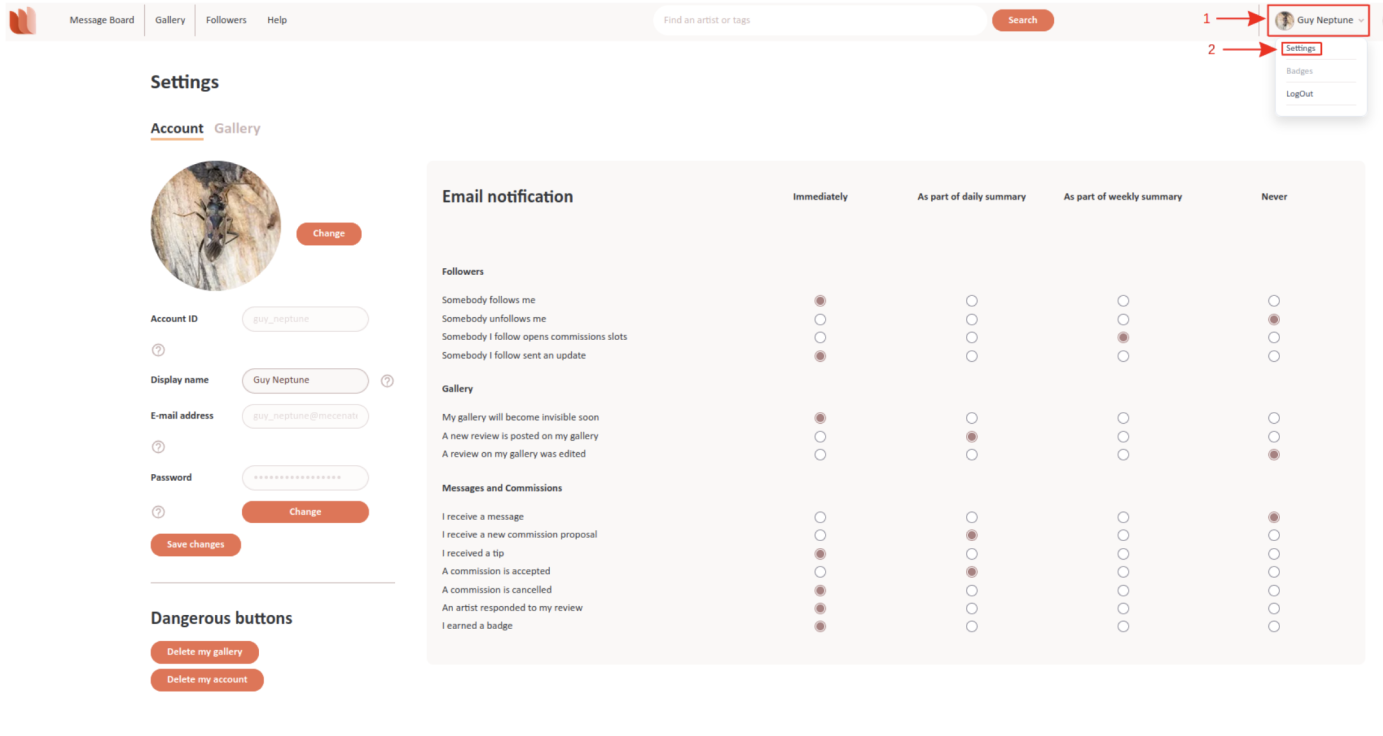
The Settings page has two tabs: Account and Gallery. The Account settings are described here, while the Gallery settings are described on the Gallery Settings help page.
Account Settings:
Picture: Click the Change button to update your profile picture.Username: This cannot be changed.Display Name: This is the name visible to others. Click the text field to edit it, then click Save changes.Email Address: This cannot be changed.Password: Click the Change button to update your password.
Dangerous Buttons:
Delete my gallery: This option appears only if you have a gallery. Deleting it is irreversible, but commissions and denarii remain.Delete my account: This permanently removes your account and denarii. Your email and username become available again after a short delay.
Email Notification Settings:
You can control how often we send you email notifications for different events:Immediately: Receive an email as soon as the event occurs.Daily Summary: A summary email at the end of the day.Weekly Summary: A summary email at the end of the week.Never: No email notifications for that event.
Notification Settings:
Some events apply to all users, while others apply only to artists.Available to All Users:Somebody I follow opens commission slots.Somebody I follow sends an update.I receive a message.A commission is accepted.A commission is cancelled.An artist responds to my review.Available Only to Artists:Somebody follows me.Somebody unfollows me.My gallery will become invisible soon.A new review is posted on my gallery.I receive a new commission proposal.
Open Commissions:
I receive open commission invitations and updates: As an artist, you receive an email when a creator invites you to an open commission or when the commission you are interested in has updates.My open commission invitation is answered: As the creator of an open commission, you receive an email when an artist you invited accepts or declines your invitation.Emails about open commissions include a link that opens the commission directly.